
How to search all open tabs on Mac
macOS can switch apps with the default Command + Tab shortcut and cycle through an app's windows with Command + Backtick, but it cannot search tabs across browsers, editors, Finder, and other apps. TabTab puts app names, window titles, tab titles, and URLs in one search.
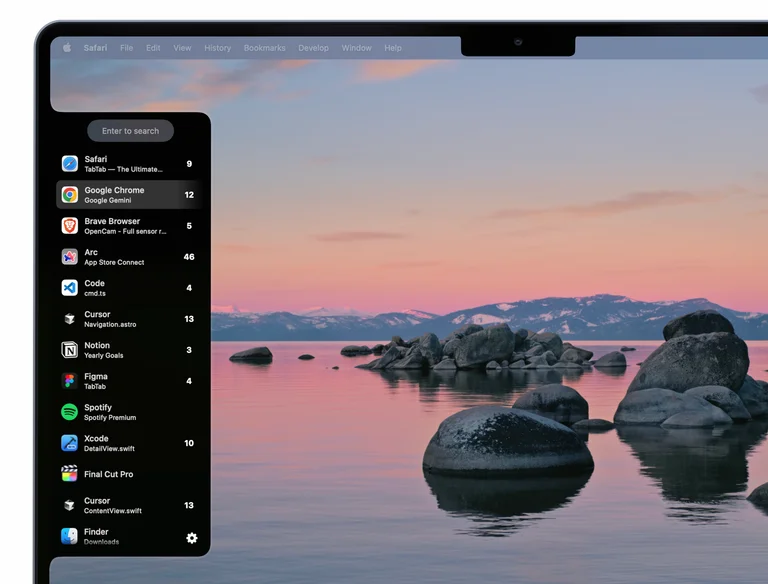
Search open tabs from one shortcut
Open TabTab from any app and type what you remember. Search for a website, document, repository, URL, window title, or app name. Choose a result to switch directly to that window or tab.
TabTab tracks tabs in supported apps, so you do not have to switch to a browser or editor first and search again there.
Open TabTab → Type a title, URL, or app → Press Enter
Why Command + Tab cannot search tabs
Command + Tab shows each running app once. Ten Safari tabs still appear as one Safari icon. Command + Backtick cycles through windows in the current app. Neither shortcut searches individual browser or editor tabs.
Apple's window-switching guide covers the built-in shortcuts. TabTab adds a searchable view of supported windows and tabs.
Start searching
- Download TabTab and open it on a Mac running macOS 14 or later.
- Follow the setup prompts and grant the requested Accessibility access so TabTab can track and switch windows and tabs.
- Choose a keyboard shortcut in TabTab's settings. Use a combination that does not conflict with shortcuts you already use.
- Open a few tabs in a supported app. Invoke TabTab, type part of a tab's title or URL, select the result, and press Enter.
No browser extension is required. The free plan tracks your five most recent windows and tabs; Pro removes that limit.
What to type when you cannot remember the tab
Start with the part you remember. These examples work when a matching tab or window is open and tracked:
- A website: type
github.comto look for an open GitHub tab by URL. - A document: type a distinctive word from its title, such as
roadmap. - An app: type
Finderwhen you remember the app but not the window title.
If the results are too broad, use a more distinctive part of the title or URL. Search only covers tracked windows and tabs, so a closed page will not appear.
If a tab does not appear
- Check that the tab is still open and its app supports tab tracking. Window switching and individual tab tracking are different features.
- On the free plan, switch to the missing window or tab first so it is among the five most recent items, then search again.
- Check that TabTab has the Accessibility access requested during setup, especially if windows are also missing or switching does not work.
- Try the latest TabTab release to get recent tab-tracking and switching fixes.
Still having trouble? Contact support with the app name and version, macOS version, and your Mac's system language.
Browsers, editors, and Mac apps
Browsers: Safari, Google Chrome, Google Chrome Beta, Brave, Microsoft Edge, Firefox, Firefox Nightly, Firefox Developer Edition, Arc, Dia, Comet, and Helium.
Code editors: Visual Studio Code, Xcode, and Cursor.
Design: Figma.
Utilities: Preview, Finder, Terminal, Notion, and Fork.
Support depends on how each app exposes its tabs to macOS. Check the TabTab FAQ for the current list.
Can macOS search every open browser tab by itself?
Some browsers, such as Chrome, include their own tab search within the app. macOS does not have one built-in search across tabs from multiple browsers and apps at the OS level.
Search or window previews?
Search is useful when you remember a title, URL, or app. Window previews are useful when you recognize a window by sight. Read TabTab vs AltTab for a closer comparison.
Supercharge navigation on your Mac
Try TabTab free on Intel and Apple Silicon Macs running macOS 14 or later.