
TabTab vs AltTab: 2026 comparison
Find the window or tab you need with one search. TabTab searches across windows and individual tabs in supported apps, so you can jump straight back to your work.
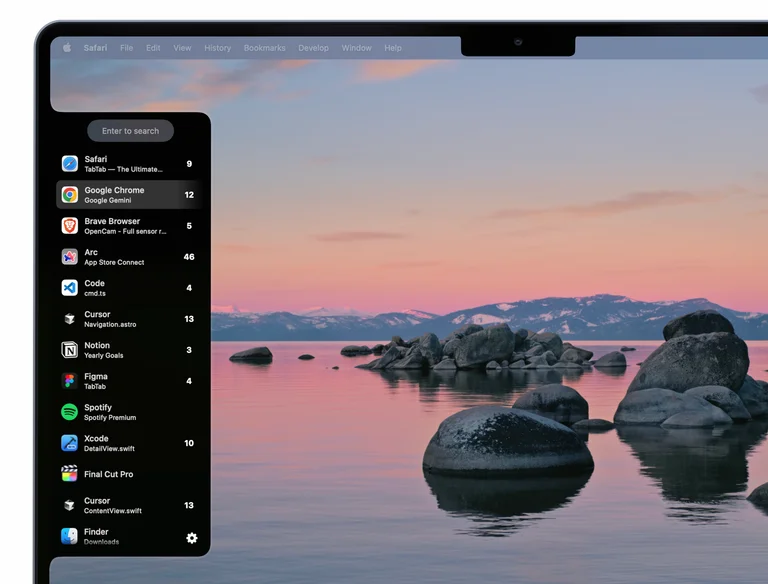
Go straight to the tab you need
Both switch windows. TabTab also keeps track of visible, minimized, and hidden windows. It searches tabs by title or URL. AltTab leaves tab search to the app after you switch.
A single browser or code editor window can hold many tabs. TabTab can match a website, document, repository, or part of a URL that you remember. It opens the result directly in supported apps such as Safari, Chrome, Arc, Firefox, VS Code, Cursor, Finder, and Figma.
- TabTab
- Find window or tab → switch
- AltTab
- Find window → switch → find the tab inside the app
Example: finding an open GitHub issue
Suppose an issue is open in one of several browser windows. With TabTab, search for a distinctive word in the issue title or part of its URL, then select the tracked tab. With AltTab, choose the browser window first, then use the browser's tab search to locate the issue.
If you remember a window's appearance instead of its title, AltTab's thumbnails may make it easier to recognize. For the search workflow, follow the guide to searching open tabs on Mac.
At a glance
| Feature | TabTab | AltTab |
|---|---|---|
| Searches | Windows and individual tabs | Windows only |
| Tab workflow | Search once and open the tab | Switch windows, then find the tab inside the app |
| Tab URL search | Yes | No |
| Interface | Clean, compact UI with app icons, browser favicons, and mouse support | Window previews, app icon, and title layouts |
| Keyboard shortcuts | Familiar macOS defaults and multiple custom shortcuts | Extensive shortcut customisation |
| Switcher actions | Minimize windows; close windows and tabs | Close, minimize, and fullscreen windows |
| Privacy | No personal data stored; limited anonymous analytics | Usage statistics stay local |
Find your place at a glance
App icons, browser favicons, titles, and URLs help you recognize the right result in a compact list.
AltTab includes thumbnail, app icon, and title layouts.
Use the keyboard or mouse to choose a TabTab result. Optional mouse activation opens TabTab when you move the cursor to the screen edge.
Familiar shortcuts. Now for your tabs, too.
TabTab mirrors familiar macOS app-switcher shortcuts wherever possible, so it feels natural from the first use. It also supports multiple custom keyboard shortcuts, including one that opens search directly. Inside the switcher, familiar keyboard commands can minimize a window or close the selected window or tab without making you switch to it first.
AltTab offers extensive shortcut customisation and several window controls. TabTab keeps the setup straightforward and brings the same quick workflow to windows and individual tabs.
One search for every window and tab
Your next task is already open somewhere. Find it with TabTab.
Updated 2026. Sources: TabTab pricing, TabTab privacy, AltTab comparison, AltTab features, and AltTab privacy.